Dubbing a Cinema 4D lesson from Portuguese into English
DubForge's demo is a real lesson: five minutes of Cinema 4D, recorded in Portuguese and dubbed into English on the same clock. Here is what it shows, why it was chosen, and a line that needed a second try.

The lesson and the dub
DubForge's demo is a Cinema 4D lesson on texturing a cookie. It runs 5:01, it was recorded in Portuguese, and its English dub is on the same clock: each thought is placed where it was said in the original, so the voice follows the picture the lesson was recorded with.
In DubForge's editor the lesson has 99 segments, each with the Portuguese and the English side by side. The first minute of the lesson and its dub plays on the demo page.
Why a Cinema 4D lesson
DubForge was started by a 3D instructor who teaches Cinema 4D and records his lessons in Portuguese. When he first dubbed them into English, the voice was fine and the timing was not: sentences rushed, pauses vanished, and "turn it off" came before the cursor got there.
A software lesson exposes that problem at once. The viewer follows the cursor, and the voice tells them where to look. If the voice runs ahead, the instruction points at something that has not happened yet. If the pauses collapse, the viewer loses the moments where the teacher waits for the screen.
A lesson full of clicks, menus and renders is a demanding test of a dub's timing, which is why the demo uses one. The same holds for any software tutorial or screen recording.
What the lesson shows
The lesson stays inside Cinema 4D, and the screen moves between three views of the cookie:
- The render: the cookie as it will look, lit and textured.
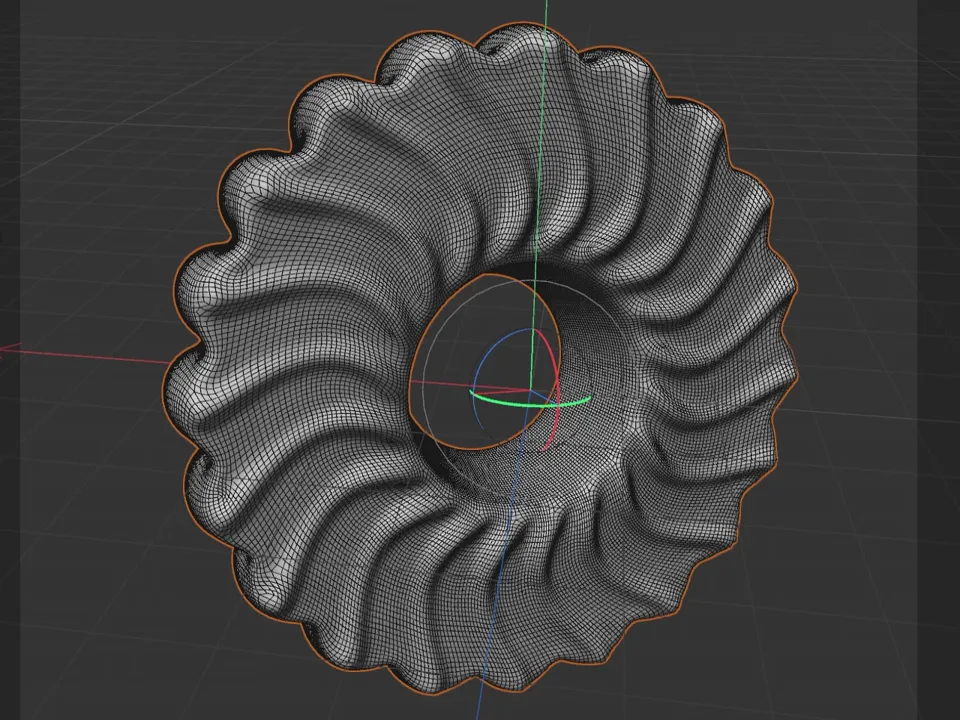
- The mesh: the cookie's surface in the viewport, with every polygon showing.
- The material: the cookie's texture built as a node graph, its nodes wired into one another.
None of these views waits for the voice. The cursor moves at the pace the teacher moved it while speaking Portuguese, so the English has to fit around the picture, never the other way round.
Keeping the pauses while the viewport works
3D software makes you wait. A render fills in, a heavy mesh redraws, a material preview updates. A teacher talks through some of those waits and leaves others quiet, and the quiet ones matter: they give the viewer time to look.
A dub that ignores those silences runs ahead. Portuguese and English rarely need the same time for the same idea, and a tool that only matches the total length, by speeding speech up or by packing silence at the end of each line, gives you sentences that rush and pauses in the wrong places.
DubForge places each thought on the video's own clock instead. A silence in the Portuguese is a silence in the English, and the voice reaches each click when the cursor does. Where the result drifts, the editor flags it: a pause that came out shorter than the original, or a line that runs faster than the original, with one click to show only those lines. Why pauses matter in dubbing goes further into this.
The test of a dubbed lesson is not its total length. It is whether each sentence lands when the screen does what it describes.
The line at 3:14
At 3:14 the lesson repeats a line it had said five seconds earlier. Teachers repeat themselves, and in speech a repeat like that is natural.
The first version of the dub said "It'll take a little longer to think." both times. Same words, same voice, five seconds apart: in English the second one risked sounding like the audio had skipped back.
The fix gave the second one its own words, "The renderer needs a little more time.", with the same meaning. It was made the way every fix in DubForge is made: by editing the translation of that segment and regenerating the whole segment, so the sentence was spoken again as one thought in the same voice, not patched word by word.
Version 1 stays available, and going back to it is free. The fix cost nothing, because it came from the free fixes: regenerating is free up to a quarter of the video's length, which on a 5:01 lesson is a little over 75 seconds.
Not every repeat needs new words. This one did because the two lines sat five seconds apart and said the same thing the same way. How to review an AI dub covers how to spot the ones that do.
Hear it and see the editor
The first minute of the lesson and its dub plays on the demo page. The editor section of the home page shows the project screen: the segments in Portuguese and English, the filters for alerts and changes, and the video with its voice lane.
Each language pair opens only after it passes DubForge's listening tests, and the account lists the pairs open today. The pair in the demo is Portuguese (Brazil) to English; the Portuguese to English guide covers that pair in detail.
If you teach software on screen, the same routine applies to your own lessons: prepare the file, let the dub keep your pauses, and review it with the picture, starting with the flagged lines and the repeats.
Questions
Can AI dub a Cinema 4D or other 3D software tutorial?
Yes. DubForge is made for software tutorials and screen recordings, and its demo is a Cinema 4D lesson dubbed from Portuguese into English. The voice follows the video's own clock, so it reaches each click when the cursor does.
How long is DubForge's demo lesson?
The full lesson runs 5:01 and has 99 segments in the editor. The first minute, with its English dub, plays on the demo page.
Which languages can a Cinema 4D lesson be dubbed into?
Each language pair opens only after it passes DubForge's listening tests, and your account lists the pairs open today. The pair in the demo is Portuguese (Brazil) to English.
Does the English dub run longer than the Portuguese lesson?
No. The English dub is on the same clock as the original: each thought is placed where it was said, so it runs alongside the same 5:01 picture.